Mobile App Development
How to Implement Clean Architecture in Flutter (Beginner Step-by-Step Guide)
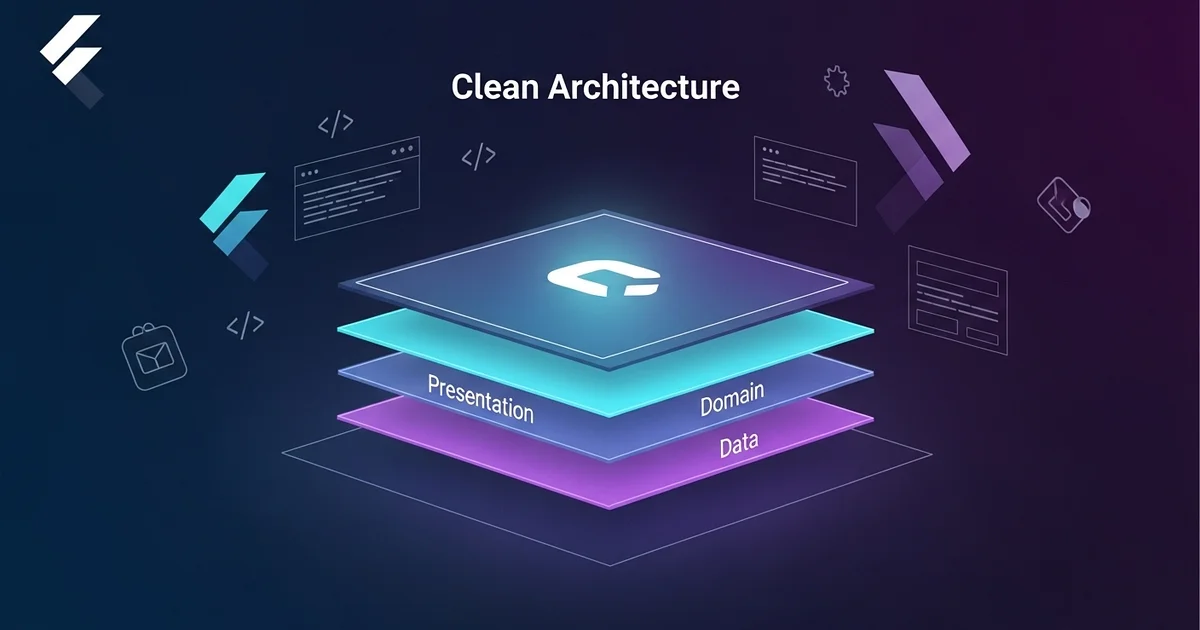
If you want to write clean, scalable, and professional Flutter code, understanding Clean Architecture is essential.In this guide, we will focus only on the core concept of Clean Architecture:
- ❌ No State Management
- ❌ No Dependency Injection
- ✅ Only core architecture (Domain + Data + Presentation)
🧠 What is Clean Architecture?
Clean Architecture is a design approach where an application is divided into layers to achieve:
- Well-organized code
- Easier maintenance and updates
- Better testability
- Scalability for large applications
🔑 The Golden Rule
- Dependencies always point inward
- Inner layers are independent and do not know about outer layers
Presentation → Domain → Data
🧱 The 3 Core Layers
1. Domain Layer (Core Logic)
- The brain of the application
- Contains business rules
- Written in pure Dart (no Flutter, no APIs)
2. Data Layer (Implementation)
- Handles API calls or local database
- Implements contracts defined in the Domain layer
3. Presentation Layer (UI)
- Displays UI
- Handles user interactions
📁 Recommended Folder Structure
lib/
├── features/
│ └── user/
│ ├── domain/
│ ├── data/
│ └── presentation/
🚀 Step-by-Step Implementation (API Example)
Let’s walk through a simple example:
👉 Fetch User from API
🧠 Step 1: Domain Layer (Start Here)
📁 lib/features/user/domain/
✅ 1.1 Entity (First File)
📁 entities/user.dart
class User {
  final int id;
  final String name;

  User({required this.id, required this.name});
}✔ Represents core data
✔ Has no dependency on external layers
✅ 1.2 Repository (Abstract)
📁 repositories/user_repository.dart
abstract class UserRepository {
  Future<User> getUser();
}✔ Defines what data is needed
✔ Does not include implementation
✅ 1.3 Use Case
📁 usecases/get_user.dart
class GetUser {
  final UserRepository repository;

  GetUser(this.repository);

  Future<User> call() {
    return repository.getUser();
  }
}✔ Represents a business action
✔ This is what the UI will call
💾 Step 2: Data Layer
📁 lib/features/user/data/
✅ 2.1 Model
📁 models/user_model.dart
import '../../domain/entities/user.dart';

class UserModel extends User {
  UserModel({required int id, required String name})
      : super(id: id, name: name);

  factory UserModel.fromJson(Map<String, dynamic> json) {
    return UserModel(
      id: json['id'],
      name: json['name'],
    );
  }
}✔ Maps API response to your app structure
✅ 2.2 Data Source (API Call)
📁 datasources/user_remote_data_source.dart
class UserRemoteDataSource {
  Future<UserModel> getUser() async {
    // Fake API call
    await Future.delayed(Duration(seconds: 1));

    return UserModel(id: 1, name: "Ali");
  }
}✔ Contains actual API logic
✅ 2.3 Repository Implementation
📁 repositories/user_repository_impl.dart
class UserRepositoryImpl implements UserRepository {
  final UserRemoteDataSource remoteDataSource;

  UserRepositoryImpl(this.remoteDataSource);

  @override
  Future<User> getUser() async {
    return await remoteDataSource.getUser();
  }
}✔ Implements the Domain contract
🎨 Step 3: Presentation Layer (Simple UI)
📁 lib/features/user/presentation/
✅ Simple UI Page (Without State Management)
📁 pages/user_page.dart
class UserPage extends StatefulWidget {
  @override
  _UserPageState createState() => _UserPageState();
}

class _UserPageState extends State<UserPage> {
  String text = "Press Button";

  void fetchUser() async {
    final dataSource = UserRemoteDataSource();
    final repository = UserRepositoryImpl(dataSource);
    final usecase = GetUser(repository);

    final user = await usecase();

    setState(() {
      text = user.name;
    });
  }

  @override
  Widget build(BuildContext context) {
    return Scaffold(
      body: Center(
        child: ElevatedButton(
          onPressed: fetchUser,
          child: Text(text),
        ),
      ),
    );
  }
}✔ Direct and simple connection
✔ Easy for beginners (no Bloc, no Provider)
🔄 Data Flow Explained
UI → UseCase → Repository → DataSource → API
API → DataSource → Repository → UseCase → UI
⚡ Recommended Development Order
- Entity
- Repository (abstract)
- Use Case
- Model
- Data Source
- Repository Implementation
- UI
❌ Common Mistakes to Avoid
- Calling APIs directly from UI ❌
- Mixing Models and Entities ❌
- Importing Flutter into Domain layer ❌
🎯 Final Summary
- Domain → Defines business logic
- Data → Implements logic
- Presentation → Displays results
👉 “Always start with the Domain — never with the UI.”
🚀 What’s Next?
- State Management (Bloc, Riverpod)
- Dependency Injection (e.g., get_it)
Clean Architecture is the foundation everything else builds on.
📚 Explore More Blogs
If you found this guide helpful, explore more mobile app development articles on our blog.